

Code Editor
maiTerm includes a full-featured code editor built on CodeMirror 6, living alongside your terminal tabs.
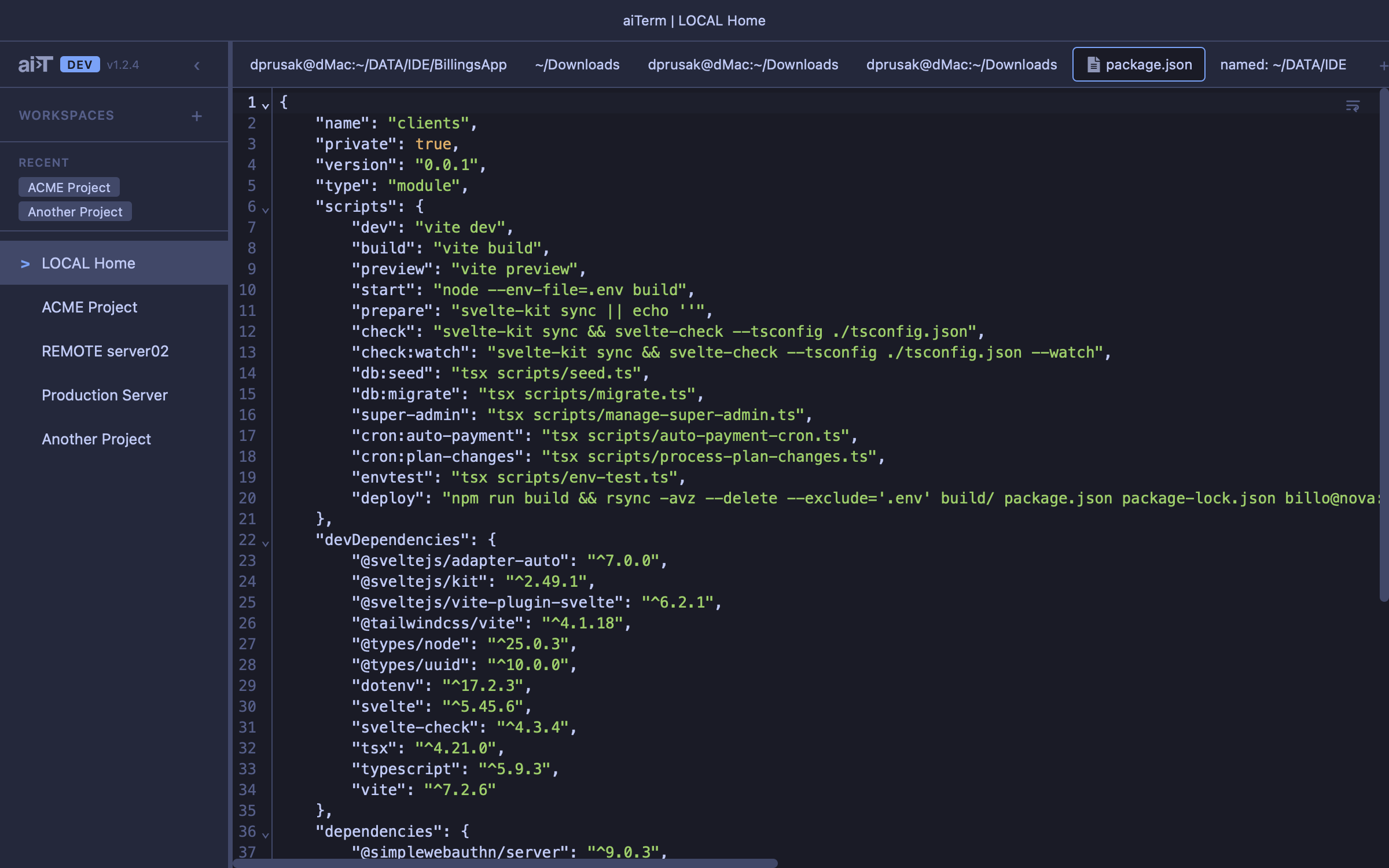
Features
- Click to open — click any file path in terminal output to open it in an editor tab. A file that’s already open is brought forward instead of opened twice, however the path is spelled (
./src/a.ts,../x,~/notes); the same path on an SSH host and on this computer are different files - Files — browse the project in the Files column; a single click opens a file in an italic preview tab that the next click reuses, and Reveal in Files on a tab’s menu shows its file in the tree
- Cmd+O — file dialog that defaults to the active terminal’s CWD
- Local + remote files — remote files read/written via SCP, transparent to the user
- 50+ languages — syntax highlighting via CodeMirror 6 first-class packages and legacy StreamLanguage modes
- Language detection — by extension, known filename (
.bashrc,Dockerfile), and shebang line - Find/replace —
Cmd+F, positioned at top of editor - Save —
Cmd+Swrites local or remote via SCP; dirty indicator in tab - Close protection — inline confirm for unsaved changes
- File watching — editor tabs detect external changes on both local files (fs events) and remote files over SSH (stat polling). Clean buffers auto-reload; dirty buffers show a conflict banner with Reload, Overwrite, Dismiss, or Merge
- Merge conflicts — when a file changes while you have unsaved edits, open an inline MergeView to reconcile: disk content on the left (read-only), your edits on the right (editable). Apply puts the merged result back without saving
- Copy path — right-click an editor tab for Copy Full Path (the local path, or the real remote path for SSH files). SSH files also offer Copy Local Copy Path — see Remote Files
Quick Open
Jump to any file without touching the mouse. Double-press Opt (or Cmd+P) to bring up the Quick Open palette:
- Fuzzy matching — type a few characters and results rank by relevance
- Glob patterns — narrow the list with patterns like
src/**/*.ts - Directory navigation —
Tabto step into a folder,Backspaceto go back, with a toggle for showing dotfiles - Smart ordering — recently-opened files surface first, then the rest sorted by modification time
.gitignoreaware — ignored files are hidden by default; toggle them back on when you need them- Remote support — over SSH, Quick Open lists files on the remote host
- Draggable — reposition the palette anywhere in the window
Picking a file opens it in an editor tab — local or remote via SCP.
Diff Review
Side-by-side diff tabs using CodeMirror’s MergeView. Created by an agent’s openDiff tool.
- Accept — writes new content to the file (local or SCP)
- Reject — responds to the agent with rejection, closes tab
- Blocking — the agent waits for your accept/reject before continuing
Image Preview
Image files (PNG, JPG, GIF, WebP, SVG, AVIF, BMP, ICO) open in a preview tab with zoom controls:
- Fit-to-window (default)
- Preset zoom steps (10%–500%)
- +/- buttons for fine control
Remote Files
Files on remote servers are accessed transparently via SCP. The SSH command is extracted from the active terminal’s foreground process, keeping the options that reach the host (a port, key file, jump host or -o option), and when maiTerm’s bridge tunnel to that host is up, the transfers go through it — so a host you reach with a password works too. Files over 2MB or binary files are rejected with a user-friendly error.
Opening a remote file reads its bytes straight into the editor and deletes the transfer temp right away, so there’s normally no local file for tooling to point at. The tab’s right-click menu closes that gap:
- Copy Full Path — copies the file’s real path on the remote host.
- Copy Local Copy Path — re-materializes the current remote-saved file on demand at a stable per-file location and copies that path. Repeat clicks reuse the same file, and same-named files from different hosts don’t collide.
maiSoft and all its products are owned by Flexmark International Inc.
World Trade Center 200-B, Suite 250, Calle 53 Este, 0832-1626 Marbella, Ciudad de Panama, Panama, Panama