Mesh Workspace
Agent Bridge connects exactly two agents. A Mesh Workspace generalizes that to N:M: flip a whole workspace into a mesh — or link several — and every named agent tab in it can message any other agent by role name. Your frontend agent can ask the backend agent a question, the backend can loop in the infra agent, and the infra agent can reply to both — all without you copy-pasting between panes, and all where you can watch it happen.
Why a mesh beats one giant agent
The obvious way to work across several repositories is one agent with everything loaded into a single context. It’s also the expensive way: that agent drags every codebase into one enormous context window and re-reads it turn after turn, burning tokens on code that’s irrelevant to the question at hand — and the bigger the context gets, the worse the agent reasons about any one part of it.
A mesh inverts that. Each agent is small and purpose-trained on its own repository — its context holds one codebase, its purpose note tells it its role, and it goes deep instead of wide. When work crosses a boundary, agents exchange short, addressed messages — a precise question, a precise answer — instead of duplicating each other’s worlds. The result is genuine cross-repository collaboration at a fraction of the token spend: you pay for a handful of focused exchanges, not for N copies of everything in one bloated context.
Addressed, never broadcast
There is no broadcast. Every message is addressed to a specific recipient and routed off a stable handle, so renaming an agent never misroutes a message. An unknown or ambiguous recipient is a hard error that lists the current roster, never a silent drop — an agent always knows whether its message landed.
A peer’s message never submits something you’re halfway through typing into a Claude Code agent’s input box. In a tab running maiTerm’s mod, a message that arrives between turns is submitted beside your draft, which stays where it is; one that arrives mid-turn, or for an agent without the mod, waits in its queue while a draft is in the box.
An agent’s opener names the peers whose agent is running. Members that are suspended or not yet started are given as a count, with listBridgedPeers to look them up — they’re still addressable, and a message to one waits until it’s up — so a large workspace doesn’t open every conversation with a roll call of parked tabs.
The mesh is also the only way across. Claude Code can message other Claude sessions on the same machine directly; in a maiTerm tab, maiTerm’s mod refuses those sends and points the agent at sendToBridgedAgent instead, so two agents talk only where you’ve meshed, linked or bridged them.
Renaming an agent mid-flight
Rename a tab in a mesh and the mesh is told. The renamed agent is informed of its new role name once — queued if it’s busy — so it stops introducing itself by the name it was given in its opener, and the roster, cockpit and message envelopes follow immediately.
The name it used to have keeps resolving too, so a peer that addressed it thirty seconds ago doesn’t get a hard “no peer named” error for a name that was correct at the time; the send tells that peer the current name, so nobody spends a turn on an announcement. A former name stops resolving the moment another tab actually claims it — the name is then simply unknown until its new holder is up, rather than quietly routing to its previous holder. Cosmetic edits — casing, an emoji — tell nobody.
Topics
Conversation in a mesh is organized into topics. A topic is owned by whoever starts it, and topics dedupe by normalized label — start “auth refactor” twice and you get the same topic, not two parallel threads talking past each other.
- Ownership — the agent (or you, the human) that opens a topic owns it.
- Completion — only the owner or the human can complete a topic. Once completed, the topic rejects further messages, so a wrapped-up thread can’t be reopened by a stray turn.
- Topics age out on their own. Agents are good at starting threads and bad at closing them, so the registry doesn’t grow forever: a topic left open with no activity for 7 days quietly completes itself (no notice is sent — its participants moved on long ago), and a completed topic is removed 48 hours later. A message sent to a topic that no longer exists is a hard error, so a late reply can’t resurrect a dead thread as a new one.
You can also prune by hand from the cockpit — an × on any topic deletes it, and Clear done sweeps out every completed one at once.
Loop control
By default a mesh flows freely — no caps, no pauses. When you want backstops against two agents thrashing indefinitely, three layered limits are available, each off by default and opt-in:
- Soft turn cap (per topic) — a back-and-forth pauses at a checkpoint when it hits the soft cap. A human resume lifts the pause by another round, so a productive exchange can keep going on your say-so.
- Hard ceiling — an absolute backstop a resume can’t clear. When a topic hits the hard cap it stops for good.
- Time-to-live — a stale topic is force-paused once its TTL elapses, even if no one hit a turn cap.
Enable and tune any of the three in the AI Agents section of Preferences.
The cockpit drawer
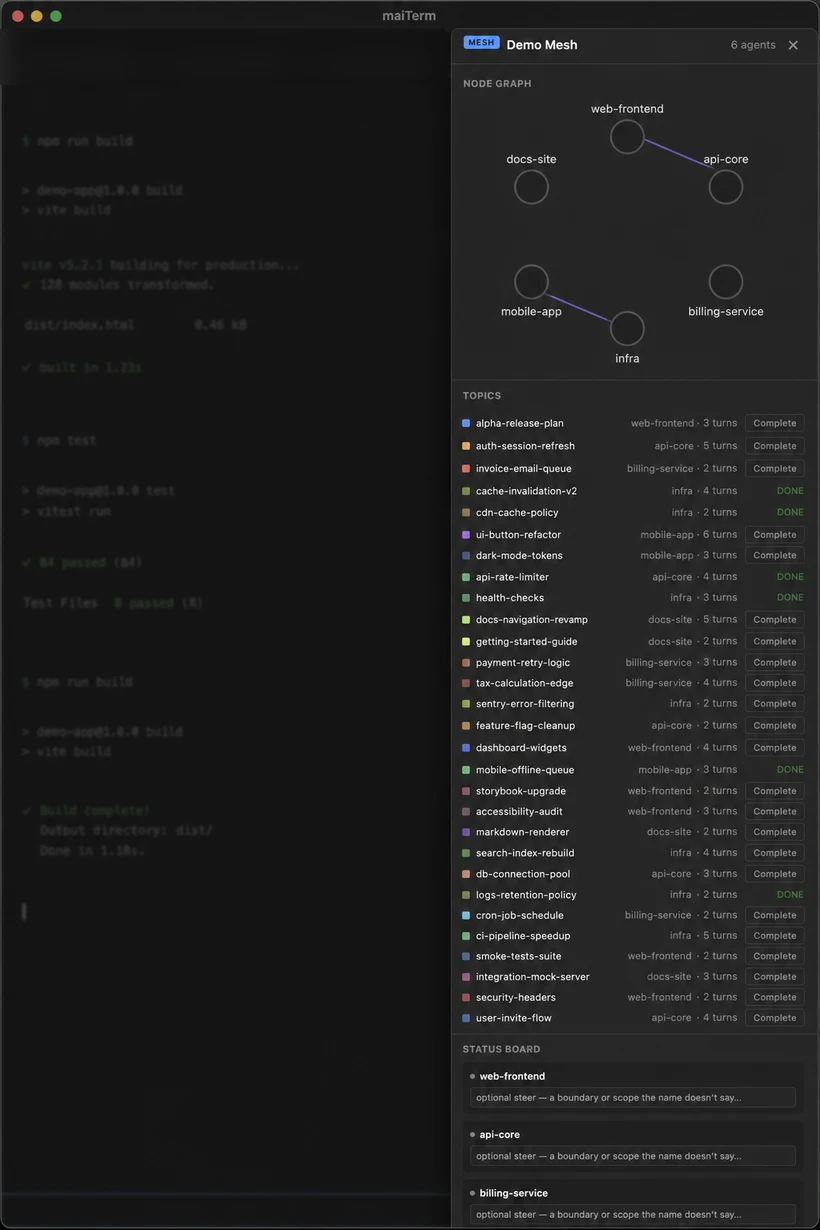
Open the cockpit with Cmd+Shift+M, or by clicking the MESH badge on a mesh workspace row in the sidebar. It gives you a single view of everything the agents are doing:
- Live conversation graph — the mesh’s agents are arranged on a circle, with topic “stars” weighted by turn count. A pulse animation lights up topics that delivered a message recently, and a halo marks agents that are currently active. Click any node to jump straight to that agent’s tab.
- Topic list — every topic with human complete and resume controls, so you can wrap a thread or lift a paused one without leaving the drawer, plus an × to delete a single topic and a Clear done button to remove the finished ones in one go.
- Status board — every agent with its live state and a needs you flag. The flag is the agent’s native awaiting-input signal — an
AskUserQuestionor a permission prompt — not guesswork parsed from terminal output, so it’s deterministic: when an agent needs a decision it asks you directly, you get one deep-linked toast, and nothing else masquerades as needing attention. (Those same prompts are what ring your phone via maiLink.)
Stage + filmstrip view
When you want to focus on a hand-off between two agents, swap the workspace’s split layout for the stage: a two-panel focused view with a live, CSS-scaled filmstrip of the other agents along the side. Click a filmstrip tile to bring that agent to the left panel; Shift+click to put it on the right. An Exit / Tab view button returns you to the normal split layout.
Promoting and demoting agents this way never reflows or respawns a terminal — the stage rearranges what you see, not the live sessions underneath.
Enabling a mesh + readiness
Right-click a workspace in the sidebar and choose Enable mesh… to turn it into a mesh; on a mesh workspace the same item reads Disable mesh. Enabling a mesh opens a pre-flight readiness modal that inventories every tab in the workspace and tells you exactly where each one stands:
- Ready — registered and good to go.
- Not registered — an agent is running there but isn’t bound to maiTerm, so nothing routes to it. Offers to Send
/maiterm initas the repair. Registration is otherwise automatic (see acting as the right tab), so this row means something went wrong rather than that a step was skipped. - Suspended — offers Wake for that tab, or Wake all to bring back everything at once.
- Unnamed — offers an inline rename, since a mesh agent needs a role name to be addressable.
Registering an agent isn’t a blind paste. A tab coming out of a resume is often sitting on a startup dialog — Claude Code’s “restore as is / compact first” prompt, say — where a typed command would answer the dialog instead of registering. maiTerm answers any such dialog first, waits for the terminal to actually go quiet (so a long compaction finishes before anything is sent), and then delivers the registration command exactly once. The response window starts when the command is genuinely delivered, so a slow-starting agent no longer reads as a failure; a row that really does time out keeps a Retry button rather than dead-ending.
After a restart, the mesh auto-rechecks readiness and offers to wake or re-init any agents that dropped, so your mesh comes back the way you left it. Each agent can also carry an optional purpose note — a one-line scope steer that tells it what its role in the mesh is — and those purposes persist across restarts.
A mesh can be handed to a teammate with Workspace Share: the workspace arrives as a mesh, every tab keeps its role name and purpose, and their agents join each other as they start. The conversations yours had stay with you.
You can also ready a whole mesh from your phone: mesh workspaces are badged in the maiLink inbox with a one-tap Initialize all that triages each member the same way — register the running-but-unregistered, resume the exited, leave the live ones alone.
Linking meshes across workspaces
Sometimes you want projects apart in the sidebar — one workspace per repository — while their agents still work as one team. Right-click a workspace and choose Link mesh with ›, then another workspace in the same window; a plain workspace picked there becomes a mesh by being linked. Links add up: link A with B, then B with C, and all three are one mesh. A linked workspace’s badge reads MESH ⇄.
Linked, they share one roster and one set of topics, and loop control applies across the lot. Tab names repeat across projects — two workspaces can each have a “Backend” — so on a linked mesh every agent is named Workspace/Tab: in the roster an agent reads, in its opener, on every message and as a topic’s owner, so the name an agent sees is one it can address. (A mesh inside one workspace keeps plain tab names.) A bare tab name still works while only one workspace has a tab by it; when two do, the send is refused with both full names. A full name whose workspace part no longer matches — that workspace was renamed, or left the mesh — is refused with the current names rather than delivered to whichever tab of that name is left. Agents already in the mesh are told once who they can now reach; the cockpit shows the combined mesh, grouped by workspace.
Unlink mesh (or Unlink in the cockpit) takes one workspace back out; it stays a mesh of its own, and each side keeps the topics its own agents started. Its agents are told who they’ve lost. The stage view, the readiness check and the phone’s Initialize all stay per workspace.
A link only spans one window. Duplicating a workspace doesn’t carry its link, since the copy beside its source would put every role on the mesh twice.
When an agent wants to change the mesh
The mesh is where you decide which agents may talk to each other, so it stays your decision. An agent can read the layout with getMeshLayout, and move tabs and workspaces around on its own, but making or unmaking a mesh, linking or unlinking meshes, a move that takes a tab into, out of or between meshes, and opening a named agent tab in a mesh workspace only file a request. It waits as a card in the Loom’s Decisions and on your phone, naming the workspaces and agents involved, and happens only when you approve it. If those workspaces or agents have changed by the time you click, it is refused and the agent has to ask again, so an approval doesn’t reach agents the card didn’t show. The one exception is making a workspace a mesh, whose card says that agent tabs added later join it too — which is what a mesh is.
maiSoft and all its products are owned by Flexmark International Inc.
World Trade Center 200-B, Suite 250, Calle 53 Este, 0832-1626 Marbella, Ciudad de Panama, Panama, Panama